REQUESTS
Request a Port call
2 min
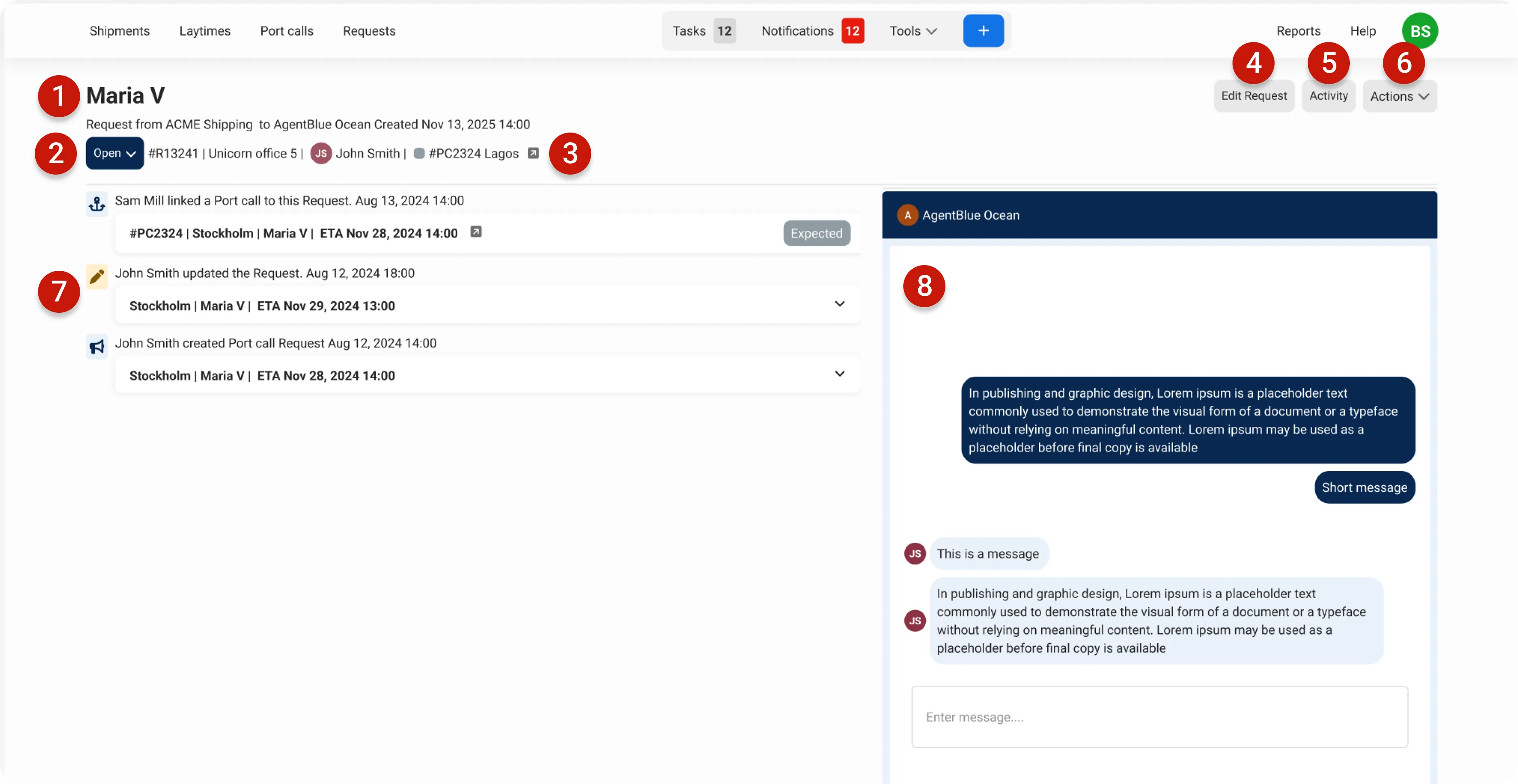
port call requests are a great way to collaborate on upcoming vessel visits clients can submit the initial information needed to get started, and agents can review and create a port call directly from the request both parties can update details as plans change, and once the port call is created, both can track progress in one place vessel name identifies the vessel for this request status track the request status (can be updated by both client and agent) link to connected port call click to navigate directly to the port call once it's created edit request update any information in the request (editing is available until a port call is created) activity view a complete history of all actions taken on this request actions menu access additional options and functionalities for the request request timeline see key activities including edits, status changes, and port call connections chat communicate with your counterpart directly within the context of this request what's next? docid\ jiu4bf8hs1sctli0fb o docid\ mnqtdfm4btewz7pzkn2gu faq who can edit the request? only the company that created the request can edit it who can change the status of the request? both the agent and client can change the status the status is shared, meaning both companies see the same information i've made a mistake and requested a port call from the wrong agent or port what do i do? the agent and port fields cannot be edited after creation if this happens, cancel the request from the actions menu, then delete it this notifies the agent that the request has been canceled and deleted, and they won't be able to create a port call from it if the agent has already created a port call, contact them directly and ask them to delete it, as the request is no longer relevant why can't i edit the request anymore? once a port call has been connected to a request, the request becomes locked to maintain a single source of truth the port call itself only the agent can edit the port call if the information is incorrect, contact your agent and ask them to make the necessary corrections who can connect a port call to a request? only the agent can connect a port call to a request they can either link an existing port call or create a new one using the data from the request i can't find my request in the open requests view where is it? once a request has a port call connected, the system automatically changes its status to "closed" and moves it to the closed tab i connected the wrong port call what do i do? you can disconnect a port call from a request by going to the request page, opening the actions menu, and selecting unlink port call once disconnected, you can connect to a different port call or create a new one