Inside a Port call
1 min
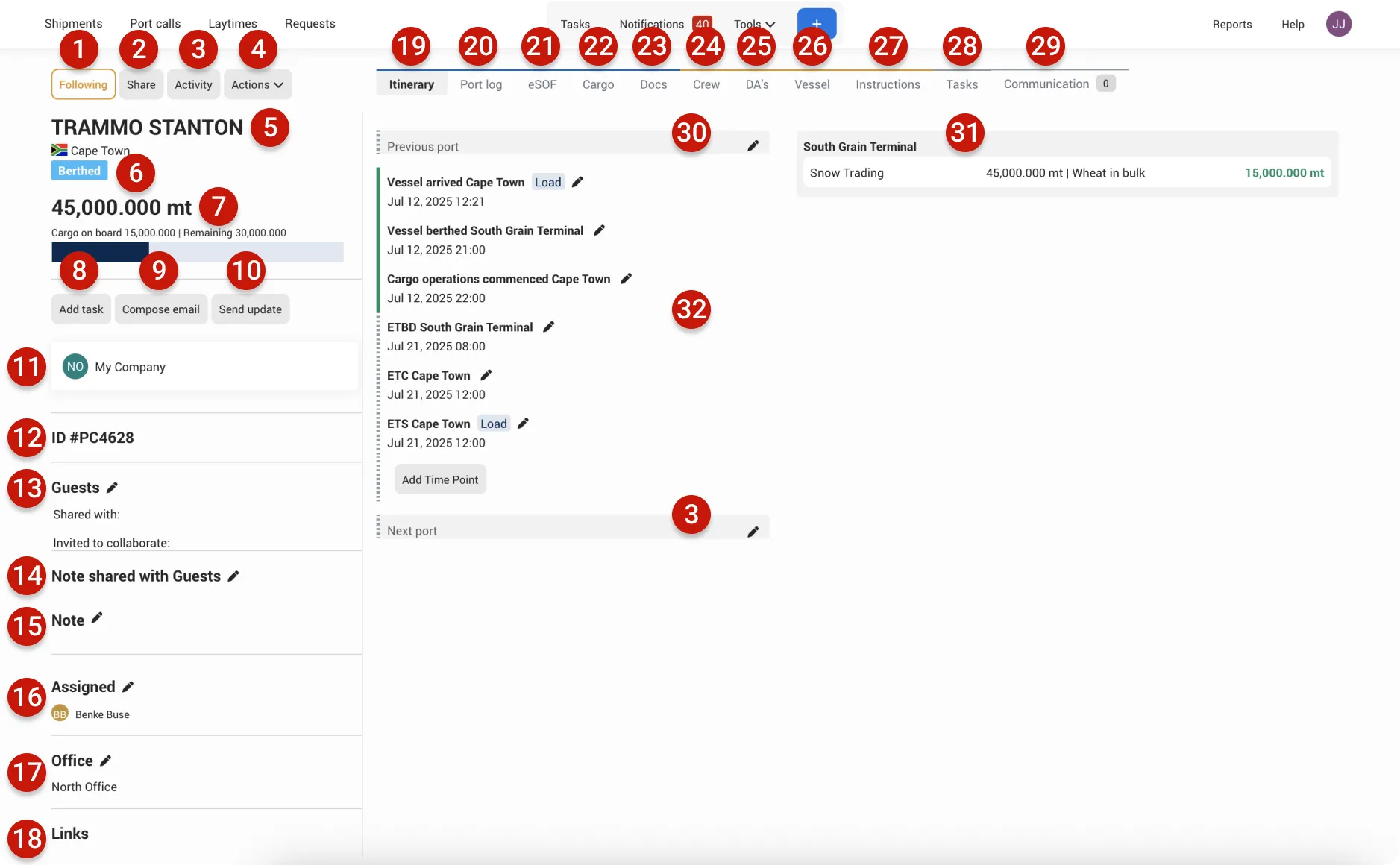
- Follow/Follwing: Follow a Port call to receive additional notifications and stay updated on the ones you’re most interested in.
- Share: Choose who to share the Port call with—either anonymously or with other compnaies on Enqlare.
- Activity: View a complete log of all activity related to the Port call.
- Actions: Access a range of Port call features and functions from this menu—such as editing itinerary details, berths, and cargoes, managing automations or email templates, creating custom documents,or closing a Port Call. These are just some of the actions available.
- Displays the name of the vessel for this Port call.
- Shows the current status of the Port call.
- Displays the total quantity of cargo added to the Port call.
- Add Task: Create tasks related to the Port call.
- Compose email: Send emails directly from within the Port call.
- Send update: Schedule automated updates to be sent to your clients.
- Chat channel: Use the internal chat to communicate with your team within the company.
- Each Port call has its own unique Enqlare identification number.
- Guests: Shared With: Companies you’ve shared the Port call with on Enqlare (read-only access). Invited to Collaborate: Companies you’ve invited with edit rights, such as sub-agents.
- Note shared with guest: Add a note that is visible to the companies you’ve shared the Port call with. Guests can also add this note to their own overview for easy reference.
- Note: Add internal notes—only visible to your company.
- Assignee: Assign a team member responsible for this Port call.
- Office: Indicate which office is handling the Port call.
- Itinerary tab: Shows key itinerary time points, including both Estimated and Actual dates and times.
- Port log: Log all operational events and time points related to the Port call.
- eSOF: Create and manage your Statement of Facts, including signatures and remarks.
- Cargo: Manage everything related to cargo, including stowage plans, mate’s receipts, and cargo sections.
- Docs: Store all documents related to the Port call. Documents can be Shared or Internal.
- Crew: Manage crew information for the vessel.
- DA's: Track and manage all Disbursement Accounts associated with the Port call.
- Vessel: View vessel particulars and live AIS tracking.
- Instructions: Store and manage all operational instructions relevant to the Port call.
- Tasks: Get a full overview of all tasks related to the Port call.
- Communication: Team chat channel, and chat channels with each company you’ve shared the Port call with, and an overview of relevant email conversations.
- Previous port: Add key dates and times related to the vessel’s previous port.
- Berth/terminal: Displays details about berths, terminals, and cargo operations.
- Time points: Track actual and estimated time points throughout the Port call.
- Next port: Add dates and times for the vessel’s next port of call.