My account
Avatar -> My account
This is where you manage your personal account details, including profile information, notification settings, and preferences. These settings help personalize your experience and keep your information up to date.
My profile
Manage your personal information and security settings. You can update your profile details, create or edit your email signature for outgoing updates, and enable or disable two-factor authentication (2FA) for added account protection.
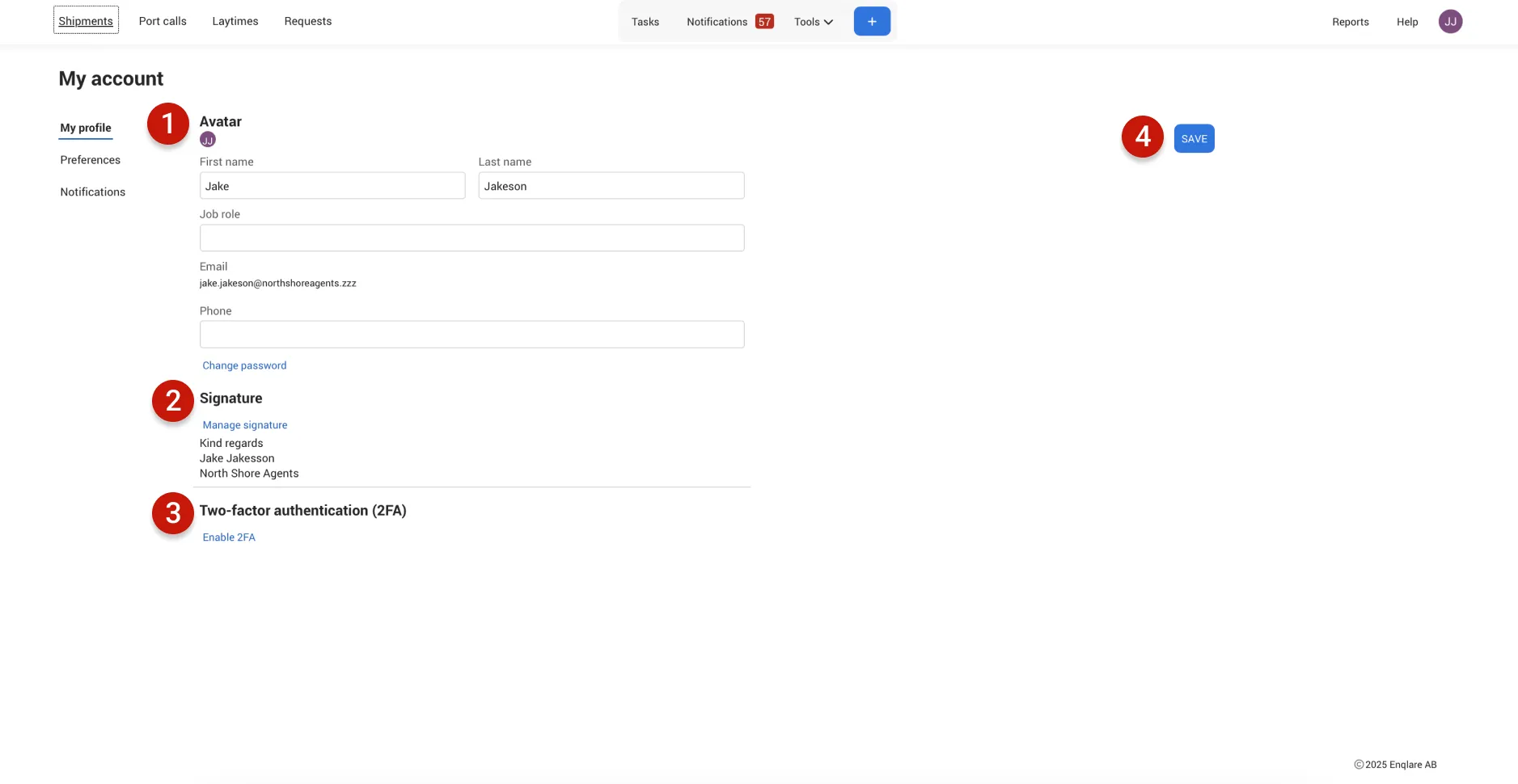
- Personal infomation: Update your personal details to keep your profile accurate.
- Signature: Add a custom signature that will appear in the emails you send to your clients from Enqlare.
- Two-factor authentication: Turn 2FA ON or OFF to control your account security.
- Save: Don’t forget to click Save after making changes to ensure your updates are applied.
Preferences
This is where you personalize your Enqlare experience. You can choose which page you land on by default, set your preferred office, and customize your overview layout to suit the way you work.
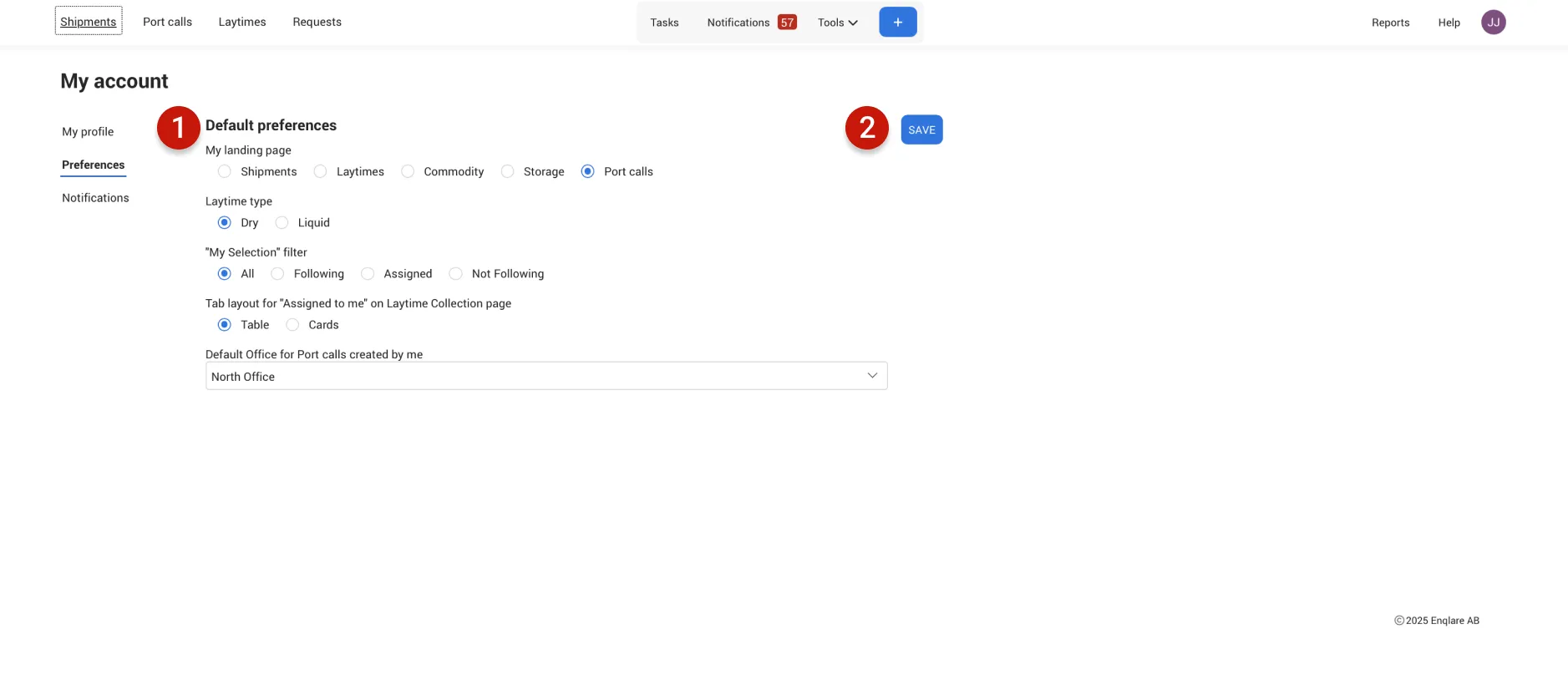
- Default preferences: Set up all your defaults in one place—choose which page you land on when you log in, which office should be applied by default, and your preferred overview layout.
- Save: Don’t forget to click Save after making changes to ensure your updates are applied.
Notifications
This is where you control how and when you receive notifications. You can customize your alerts to appear in the notification hub in Enqlare or directly in your email, ensuring you stay informed about what matters most to you.
You can receive notifications in three ways:
- On platform: Get notifications directly in Enqlare, with a link that takes you straight to the relevant context.
- Email: Receive notifications via email.
- Push (Comming soon): Receive notifications directly on your mobile device.
Unassociated emails
| |
|---|---|
New unassociated email | Alerts you whenever a new email arrives that hasn’t been linked to any shipment or conversation. You can only receive this notification on platform. |
Shipments
| |
|---|---|
Updates on Shipments in Chartering stage | Alerts you whenever someone on your team updates a shipment in the chartering stage—from Not Firm to Clean Fixture status. |
Updates on Shipments in Post-fixture stage | Alerts you whenever someone on your team updates a shipment in the post-fixture stage, starting when the vessel sails to the first loading port. |
New chat messages | Notifies you when new chat messages are posted on shipments you follow. |
New associated conversations | Notifies you when new email conversations are linked to shipments you follow. |
New shared Shipments | Alerts you when another company shares a shipment with your company on Enqlare. |
I'm a member to a new Shipment | Notifies you when someone on your team creates a new shipment and you are added as a member. |
New Shipment, task assigned to me | Notifies you whenever a shipment or task is assigned directly to you. This notification cannot be turned off and will appear on platform notifications page. |
Chat mention | Notifies you whenever your name is mentioned in a chat conversation. Since this is directed specifically to you, this notification cannot be turned off and will appear on platform notifcations. |
Laytime collections
| |
|---|---|
Updates on Laytime collections | Alerts you whenever someone on your team makes changes to a Laytime collection you follow. |
New shared Laytime collections | Notifies you when another company shares a Laytime collection with your company on Enqlare. |
New chat messages | Notifies you when new chat messages are posted on Laytime collections you follow. |
New associated conversations | Alerts you when new email conversations are linked to Laytime collections you follow. |
New Collection, task assigned to me | Notifies you whenever a Laytime collection or task is assigned directly to you. This notification cannot be turned off and will appear on platform. |
Chat mention | Notifies you whenever your name is mentioned in a chat conversation. Since this is directed specifically to you, this notification cannot be turned off and will appear on platform. |
Port calls
| |
|---|---|
Updates on Port calls | Alerts you whenever someone on your team makes changes to a Port Call you follow. |
New shared/requested Port calls | Notifies you when a Port Call is shared or requested with your company. |
New chat messages | Notifies you when new chat messages are posted on Port Calls you follow. |
New associated conversations | Alerts you when new email conversations are linked to Port Calls you follow |
Automations | Notifies you when someone on your team creates a new Port Call and you are added as a member. |
I'm a member to a new Port call | Notifies you whenever a Port Call or task is assigned directly to you. This notification cannot be turned off and will appear on platform. |
New Port call, task assigned to me | Notifies you whenever a Port Call or task is assigned directly to you. This notification cannot be turned off and will appear on platform. |
Chat mention | Notifies you whenever your name is mentioned in a chat conversation. Since this is directed specifically to you, this notification cannot be turned off and will appear on platform. |
Requests
| |
|---|---|
PDA request created | Alerts you whenever a new PDA request is created and you are a member. |
New email associated | Notifies you when a new email is linked to a PDA request. |
PDA request assigned to me | Notifies you whenever a PDA request is assigned directly to you. |